How Atomic DDL Works in MySQL 8.0
A deep dive into MySQL 8.0's Atomic DDL — the unified Data Dictionary, how the InnoDB DDL log serves as redo or undo to make DDL atomic, and the binlog DDL crash-safety and CREATE TABLE ... SELECT improvements.
Before MySQL 8.0, DDL was not crash-safe. There were three main problems:
The metadata in the server layer and the metadata/data in InnoDB could become inconsistent.
The server-layer metadata was stored in files — for example, table definitions were kept in
.frmfiles — while InnoDB kept its own copy of the metadata in its tables. A crash could leave the server-layer metadata inconsistent with InnoDB’s metadata or even with the table data. For example, the server layer still had the table’s.frmfile and believed the table existed, but InnoDB’s.ibddata file was gone, so InnoDB believed the table did not exist.- InnoDB’s metadata and data could become inconsistent.
The binlog and the data could become inconsistent.
For example, after a crash and restart the table already existed, but the
CREATE TABLEhad not been written to the binlog.
To implement Atomic DDL and fully solve these problems, MySQL 8.0 made changes in three areas:
It removed the server-layer metadata files and stored all metadata in InnoDB tables.
These tables are called the Data Dictionary. Users, the server layer, and the storage engines all query or update metadata through the Data Dictionary access interface.
The DDL log.
InnoDB implements a DDL log table that records DDL operation entries during a DDL. InnoDB uses the DDL log to guarantee the atomicity of the file operations and metadata operations within a DDL.
Binlog DDL crash safety.
The binlog event for a DDL records the DDL’s transaction
Xid, and theXidis used to make the binlog crash-safe.
The DDL Transaction
The basic idea behind DDL atomicity is to turn the DDL process into a transaction, and to use the atomicity of the transaction to guarantee the atomicity of the DDL. MySQL 8.0 stores all metadata in InnoDB tables, so operating on metadata is really just performing INSERT, UPDATE, or DELETE on InnoDB tables. Metadata operations can therefore be carried out entirely within a single transaction, and for DDL that only modifies metadata, one transaction is enough to guarantee atomicity — for example, creating, altering, or dropping a view, function, or trigger.
A DDL statement opens a transaction while it runs; we call it the DDL transaction (DDL Trx). Committing the DDL transaction is equivalent to the DDL succeeding.Everything the DDL does within the transaction can be rolled back before it commits, but not once it has committed.
The InnoDB DDL Log
For DDL that involves file operations, InnoDB writes the file operations as entries into the DDL log table, and places the DDL log operations and the metadata operations in the same transaction to make the DDL atomic.
The DDL statements that involve file operations are:
CREATE TABLEALTER TABLEDROP TABLERENAME TABLECREATE INDEXDROP INDEXDROP DATABASE
The DDL Log Table
The DDL log table is defined as follows:
1
2
3
4
5
6
7
8
9
10
11
12
CREATE TABLE mysql.innodb_ddl_log (
  id            BIGINT UNSIGNED NOT NULL AUTO_INCREMENT PRIMARY KEY,
  thread_id     BIGINT UNSIGNED NOT NULL,
  type          INT UNSIGNED NOT NULL,
  space_id      INT UNSIGNED,
  page_no       INT UNSIGNED,
  index_id      BIGINT UNSIGNED,
  table_id      BIGINT UNSIGNED,
  old_file_path VARCHAR(512) COLLATE UTF8_BIN,
  new_file_path VARCHAR(512) COLLATE UTF8_BIN,
  KEY(thread_id)
);
The DDL log table records the following kinds of operation:
DELETE SPACE
Delete the specified tablespace file.
DROP
Delete the specified table’s entry from
mysql.innodb_dynamic_metadata.RENAME SPACE
Rename the specified table’s tablespace file.
RENAME TABLE
Rename the specified table, including updating its metadata and the table name in the statistics tables.
FREE
Delete the specified index.
REMOVE CACHE
Remove the specified table from the table cache.
How the DDL Log Is Used
A DDL statement is executed in two phases:
The DDL transaction phase.
During the DDL transaction, some operation entries are written into the DDL log table.
The post-DDL phase.
The entries written into the DDL log table are read back and executed in reverse order. Whether the DDL transaction succeeds or fails, the entries recorded in the DDL log table (if any) are executed.
The DDL log can be viewed as a combination of a redo log and an undo log. Some DDL uses it as redo, some uses it as undo, and some uses it as both redo and undo.
Using the DDL Log as Redo
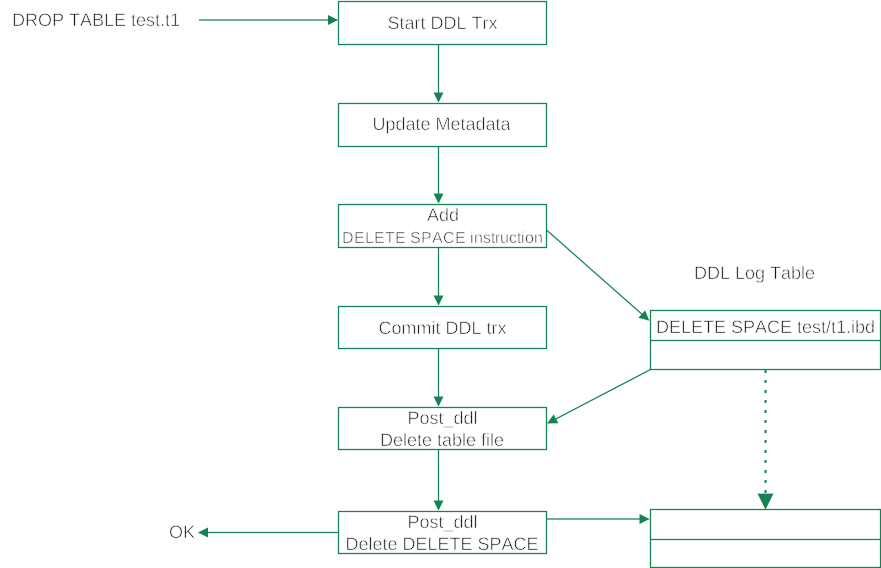
DROP TABLE uses the DDL log as redo.
- During the DDL transaction phase, DROP TABLE deletes the metadata and inserts a DELETE SPACE entry into the DDL log. Once the DDL transaction commits, it can no longer be rolled back.
- During the post-DDL phase, the actual file deletion is performed according to the DELETE SPACE entry in the DDL log.
After the file deletion completes, the entry in the DDL log table is deleted.
The entries in the DDL log table are idempotent, so executing them more than once does not affect correctness. That is why executing an entry from the DDL log table and deleting that entry from the DDL log table need not be atomic.
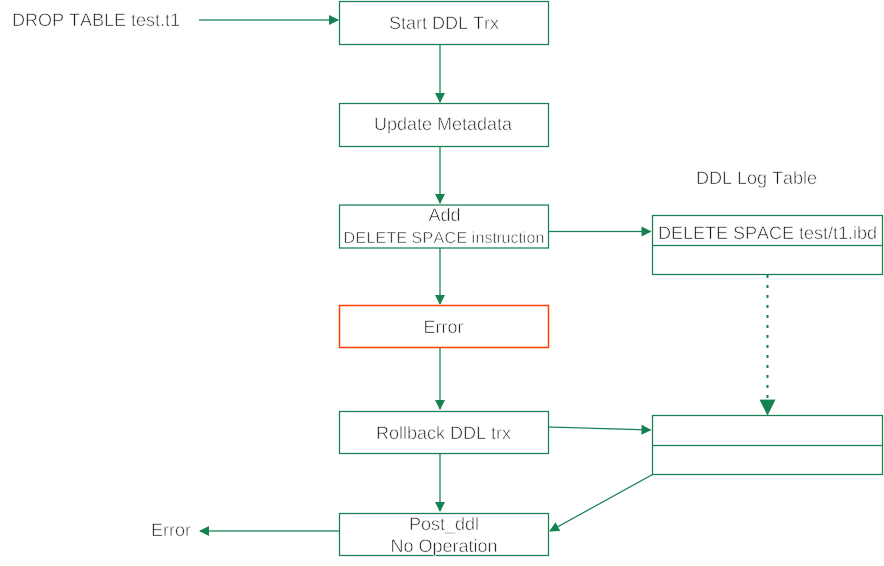
If an error occurs during the DDL transaction phase, the DDL transaction rolls back, and the DELETE SPACE entry in the DDL log table is rolled back with it. The post-DDL phase then does nothing.
Using the DDL Log as Undo
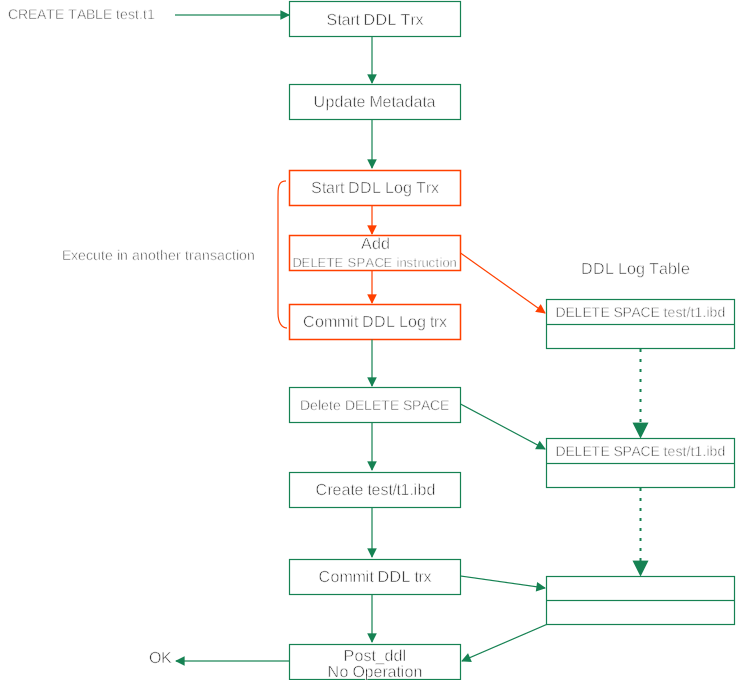
CREATE TABLE, by contrast, uses the DDL log as undo.
- During the DDL transaction phase, CREATE TABLE first records a DELETE SPACE entry in the DDL log. This entry is written and committed by a separate transaction, which we call the DDL log transaction (DDL Log Trx).
- It then deletes the corresponding DELETE SPACE entry from the DDL log table within the DDL transaction.
- Finally it creates the table file and, on success, commits the DDL transaction.
- If the DDL transaction commits, the DELETE SPACE entry in the DDL log table has already been deleted, so the post-DDL phase does nothing.
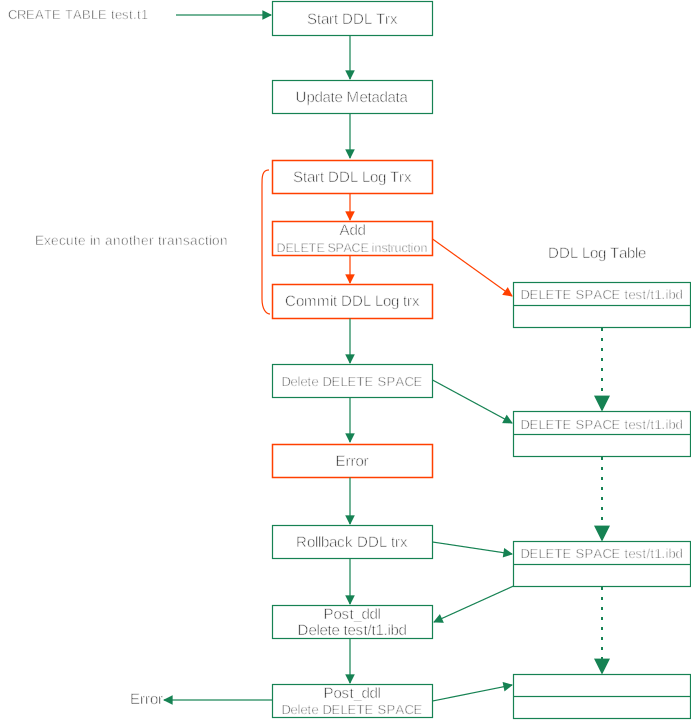
If an error occurs, the DDL transaction rolls back, and the DELETE SPACE entry in the DDL log table is retained. The post-DDL phase then deletes the table file according to the entry in the DDL log table and deletes the entry from the DDL log table.
innodb_print_ddl_logs
To make debugging easier, InnoDB provides an option that records all operations on the DDL log table to the error log. It can be turned on and off dynamically through the innodb_print_ddl_logs variable.
Let us now look at the detailed process of several DDL statements.
CREATE TABLE
CREATE TABLE uses the DDL log as undo; when the DDL fails, it uses the DDL log to roll back the file-creation operation.
1
CREATE TABLE t1(c1 INT PRIMARY KEY, c2 VARCHAR(20), INDEX(c2));
This DDL performs the following operations on the DDL log table:
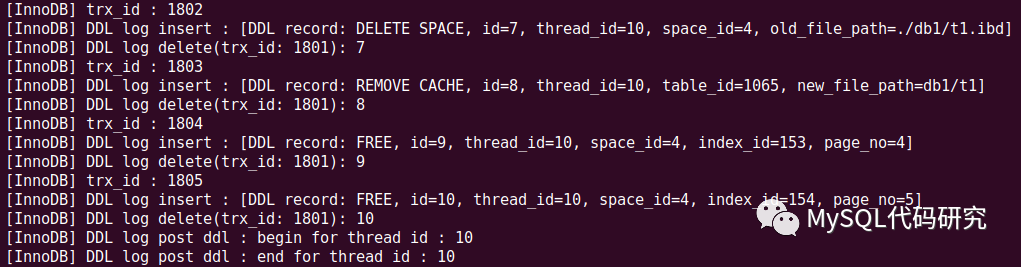
- The DDL log transaction (1802) records a DELETE SPACE rollback entry, with record ID 7.
- The DDL transaction (1801) deletes record ID 7 from the DDL log table.
t1is added to the table cache. Rolling back the table cache relies on the DDL log table, so a REMOVE CACHE entry is first added to the DDL log table by the DDL log transaction (1803), and then deleted by the DDL transaction (1801).- The two FREE entries that follow are the rollback logs for the clustered B-tree and the secondary-index B-tree. For CREATE TABLE, dropping the B-trees is unnecessary — deleting the file is enough — so DROP TABLE has no step for dropping the B-trees.
- After the DDL transaction (1801) commits, all the entries added to the DDL log earlier have been deleted, so the post-DDL phase does nothing.
DROP TABLE / DROP DATABASE
DROP TABLE uses the DDL log as redo; after the DDL succeeds, the post-DDL phase performs the file deletion according to the entries in the DDL log table.
1
DROP TABLE t1, t2;
This DDL performs the following operations on the DDL log table:
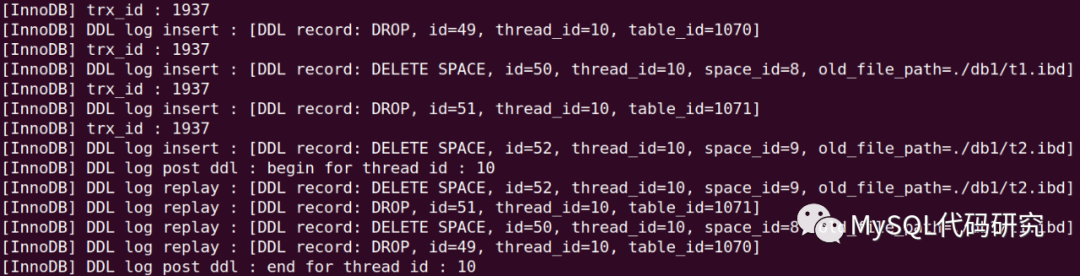
- A DROP entry is recorded to delete
t1’s entry frommysql.innodb_dynamic_metadata.innodb_dynamic_metadatais a special table: operations on it are not undo-logged and cannot be performed within the DDL transaction. An entry is therefore recorded in the DDL log table and executed in the post-DDL phase. - A DELETE SPACE entry is then recorded to delete
db1/t1.ibd. - The same operations are repeated for table
t2. - After all tables have been processed, the DDL transaction (1916) commits. At this point four entries have been inserted into the DDL log table.
- In the post-DDL phase, these four entries are executed in reverse order to perform the actual deletions. Redo entries can in fact be executed in any order, but undo entries must be executed in reverse order because of their dependencies. Presumably for simplicity and uniformity, the post-DDL phase always executes entries in reverse order.
DROP DATABASE operates on the DDL log table the same way as dropping every table in the specified database.
CREATE INDEX
CREATE INDEX uses the DDL log as undo; when index creation fails, it uses the entry in the DDL log table to roll back the index being created.
1
ALTER TABLE t2 ADD INDEX ind1(c3);
This DDL performs the following operations on the DDL log table:

- Before creating the B-tree, the DDL log transaction (1872) records a FREE rollback entry, with record ID 30.
- The DDL transaction (1871) deletes the FREE entry from the DDL log table.
- The DDL transaction updates the metadata and creates the B-tree.
- Finally the DDL transaction (1871) commits. After the commit, the entry in the DDL log table has already been deleted, so the post-DDL phase does nothing.
DROP INDEX
DROP INDEX uses the DDL log as redo.
1
ALTER TABLE t2 DROP INDEX ind1;
This DDL performs the following operations on the DDL log table:

- The DDL transaction inserts a FREE entry into the DDL log table.
- It updates the metadata and commits the DDL transaction.
- In the post-DDL phase, the index’s B-tree is deleted according to the FREE entry in the DDL log table.
RENAME TABLE
RENAME TABLE uses the DDL log as undo.
1
RENAME TABLE t2 TO t20;
This DDL performs the following operations on the DDL log table:

- Before renaming the file, the DDL log transaction (1909) inserts a RENAME SPACE entry into the DDL log table. This is an undo entry, so it renames
t20.ibdback tot2.ibd. - The DDL transaction deletes the RENAME SPACE entry written by the DDL log transaction.
The DDL log transaction (1909) inserts a RENAME TABLE entry into the DDL log table. This is an undo entry, so it renames
t20back tot2.A rename has to update some in-memory structures, and the table name in
innodb_table_statsis updated by a separate transaction that cannot be rolled back. A RENAME TABLE entry is therefore recorded so that the rollback can be done by renaming in the reverse direction.- The DDL transaction deletes the RENAME TABLE entry written by the DDL log transaction.
- After the DDL transaction (1908) commits, the entries in the DDL log table have already been deleted, so the post-DDL phase does nothing.
ALTER TABLE
There are many kinds of ALTER TABLE; the most complex is the case that requires rebuilding the table. In that case the DDL log is used as both redo and undo.
1
ALTER TABLE t2 ADD COLUMN c3 int ALGORITHM = INPLACE;
This DDL performs the following operations on the DDL log table:
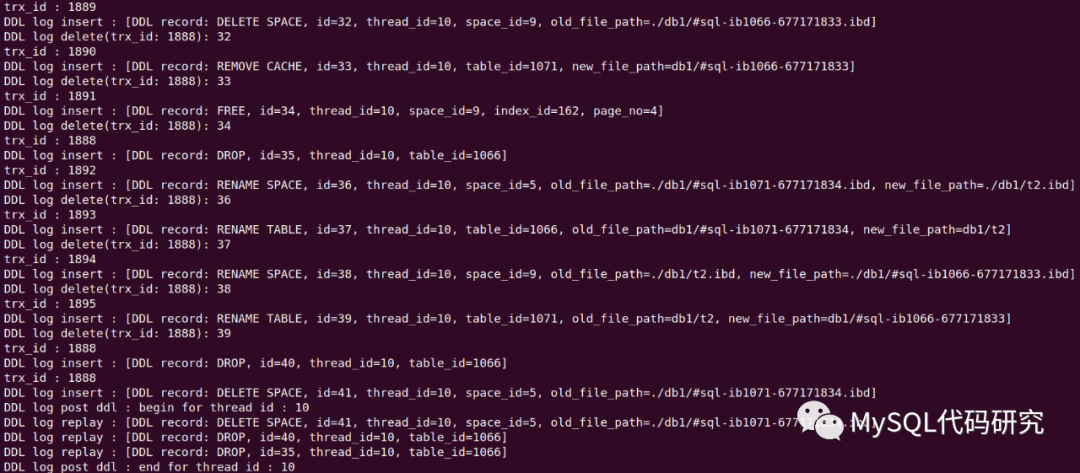
ALTER TABLE combines the operations of CREATE TABLE, RENAME TABLE, and DROP TABLE:
- Create the temporary table
db1/#sql-ib1066-677171833, and record an undo entry to delete it. - Rename
db1/t2todb1/#sql-ib1071-677171834, and record an undo entry for the reverse rename. - Rename
db1/#sql-ib1066-677171833todb1/t2, and record an undo entry for the reverse rename. - Delete the table
db1/#sql-ib1071-677171834, and record a redo entry to delete the file.
Summary of DDL Log Usage
- A DDL is executed in two phases: the DDL transaction phase and the post-DDL phase.
- The DDL transaction phase inserts redo and/or undo entries into the DDL log table.
- The post-DDL phase executes the entries in the DDL log table.
- When used as redo, the redo entries are inserted into the DDL log table by the DDL transaction, and the post-DDL phase executes them.
- When used as undo, the undo entries are inserted into the DDL log table by the DDL log transaction, and then deleted by the DDL transaction. If the DDL transaction commits, the post-DDL phase does nothing; if the DDL transaction rolls back, the post-DDL phase performs the rollback according to the entries in the DDL log table.
- The entries in the DDL log table are idempotent and can be executed more than once without affecting correctness.
DDL Crash Recovery
A crash can happen before the post-DDL phase finishes, so during recovery after a restart, the server must check the DDL log table and complete all outstanding post-DDL operations according to its entries.
Binlog Crash Safety
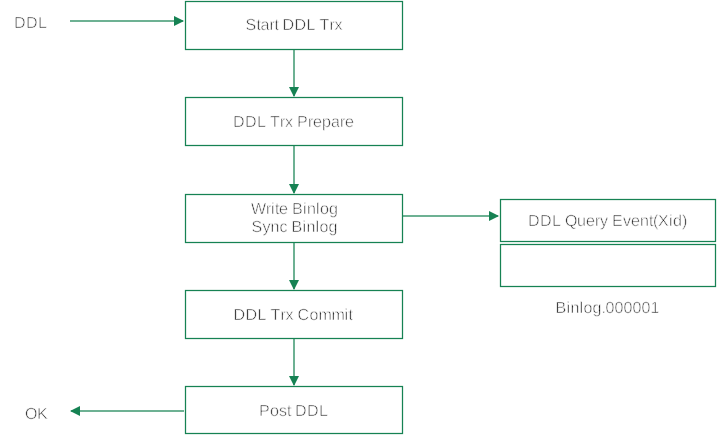
Every DDL is now a transaction: if it fails midway it can be rolled back, and if it commits the DDL has succeeded. When the binlog is enabled, the DDL transaction also uses two-phase commit. MySQL 8.0 extended the binlog’s Query_log_event so that the DDL transaction’s Xid is stored in the Query_log_event.

During crash recovery, the Xid in the DDL’s Query_log_event can then be used to decide whether to commit or roll back a DDL transaction that is in the prepared state.
CREATE TABLE … SELECT
In the binlog, CREATE TABLE … SELECT is split into a CREATE TABLE part and an INSERT part (in row format), as shown below:
1
2
3
4
5
CREATE TABLE t1   // Query_log_event
BEGIN             // Query_log_event
                  // Table_map_log_event
INSERT            // Write_rows_log_event
COMMIT            // Xid_log_event
Before MySQL 8.0.21, the CREATE part and the INSERT part were two independent transactions, so atomicity was impossible. For that reason CREATE TABLE … SELECT was disallowed when GTID was enabled.
After implementing Atomic DDL, MySQL 8.0.21 improved CREATE TABLE … SELECT. The CREATE TABLE part and the INSERT part can now run in the same transaction, with atomicity guaranteed. CREATE TABLE … SELECT can therefore be used when GTID is enabled.
1
2
3
4
5
BEGIN                                      // Query_log_event
CREATE TABLE t1 (......) START TRANSACTION // Query_log_event
                                           // Table_map_log_event
INSERT                                     // Write_rows_log_event
COMMIT                                     // Xid_log_event
A real example is shown below:
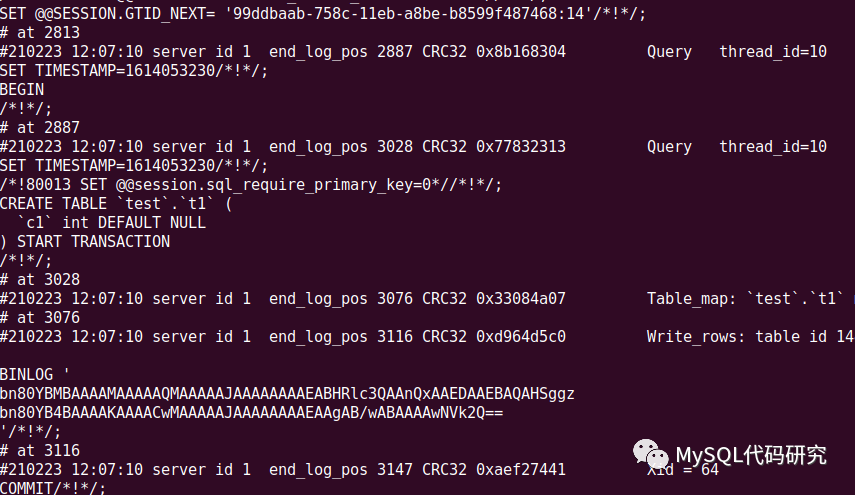
As we can see, MySQL extended the CREATE TABLE statement so that CREATE TABLE and the DML run in the same transaction.
1
CREATE TABLE ... START TRANSACTION;
A DDL automatically commits the current transaction when it finishes. With the START TRANSACTION extension, the CREATE TABLE statement no longer ends the current transaction automatically. So the following DML runs in the same transaction as the CREATE TABLE. Currently, CREATE TABLE … START TRANSACTION is only for replica to replay CREATE TABLE … SELECT. But This improvement shows that once Atomic DDL is in place, making DDL transactional is not difficult, and in the future more DDL may be able to run in the same transaction as DML.