Recovery Optimization for Large MySQL Transactions
This article is also available in Chinese: 中文版. Browse all English articles.
Have you ever run into a mysqld process that has been starting for a long time and still won’t come up? When that happens, you can use perf top to check what the MySQL process is mainly doing. If what you see looks like the figure below — the MySQL main thread (the one starting from mysqld_main) spending the vast majority of its time rolling back transactions — then you are very likely hitting a large-transaction rollback.
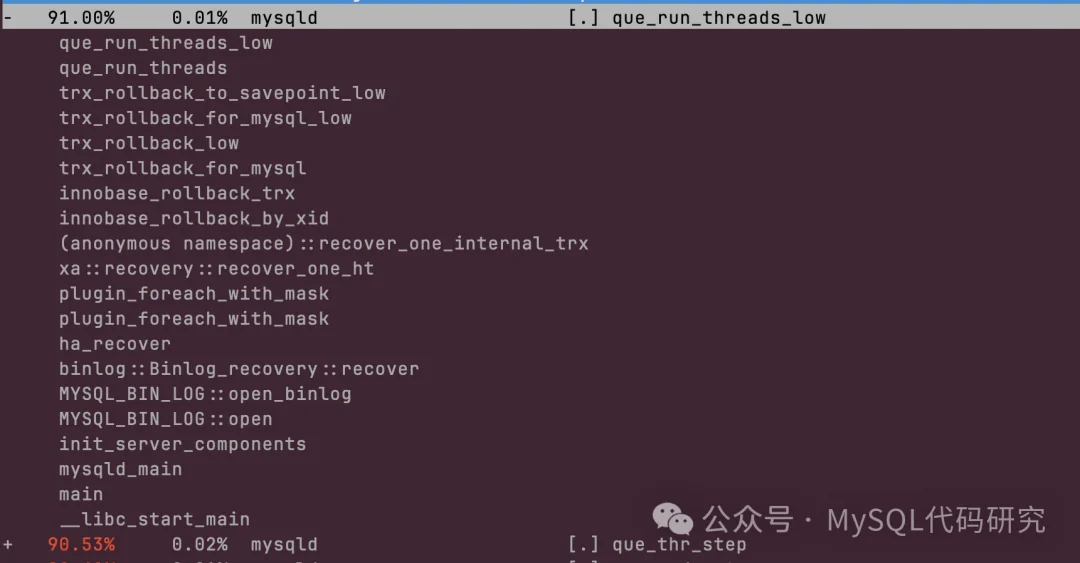
The most common way to get here is a large transaction that fills up the disk while writing its binlog, crashing the instance. The largest binlog file I have run into was over 114GB. Since the Binlog Cache’s temporary file is only cleaned up after the binlog is written, that transaction occupied 228GB in total. The MySQL parameter binlog_error_action controls the behavior when writing to the binlog file fails. The default is ABORT_SERVER, which shuts the process down. You can also set it to IGNORE_ERROR, which closes the binlog file on a write failure so that later transactions produce no binlog at all. That obviously leaves the primary and the replica inconsistent, so don’t use it unless you have no other choice.
Root Cause
Why does the main thread have to roll transactions back when the MySQL process starts? It comes from the binlog crash-safe mechanism; here is only a brief overview. DML in a transaction produces binlog events, and when the transaction commits, those events are written to the binlog file and persisted. To keep the data and the binlog consistent after a crash and restart, MySQL designed a crash-safe mechanism that applies two-phase commit (2PC) to ordinary transactions, also known as internal XA.
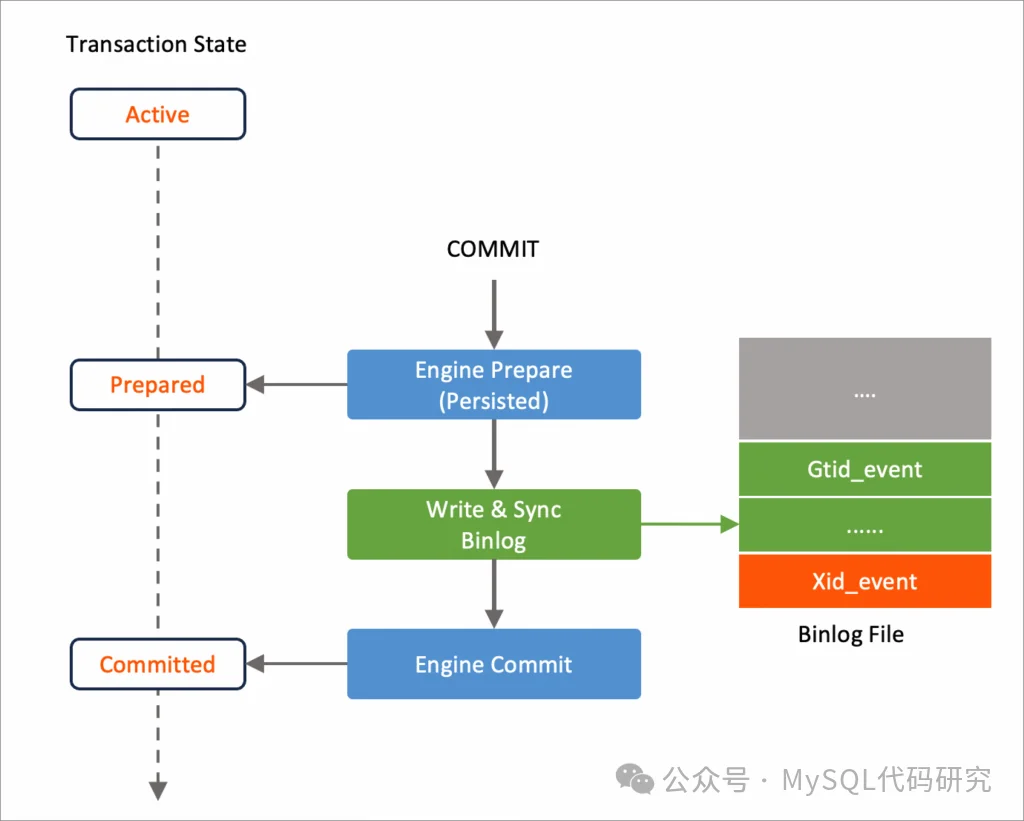
As the figure shows, under internal XA a transaction commits in three steps:
- The storage engine
preparesthe transaction. The transaction state changes fromACTIVEtoPREPARED, and both the state and theXIDare persisted to the redo log. - The transaction produces an
Xid_event, which is written to the binlog file together with the DML binlog events and persisted. - The transaction commits.
When the server goes down unexpectedly, a transaction may be in one of the following states:
Active: under two-phase commit, this kind of transaction was never written to the binlog.Prepared but not written to the binlog (or only partially written): the transaction is already in the Prepared state, but its XID does not appear in the binlog file.Prepared and written to the binlog: the transaction is already in the Prepared state, and its XID appears in the binlog file.Committed: the transaction has been written to the binlog and committed.
For a Committed transaction, the design already guarantees that its binlog events made it into the binlog file, so the binlog and the data are consistent and nothing needs to be done at startup. For an Active transaction, the binlog events certainly never reached the binlog file, and InnoDB has a background rollback thread that rolls it back automatically. A Prepared transaction has to be handled according to the XID information in the last binlog file: if its XID appears in the binlog file, the transaction must be committed to keep the binlog and the data consistent; otherwise it must be rolled back.
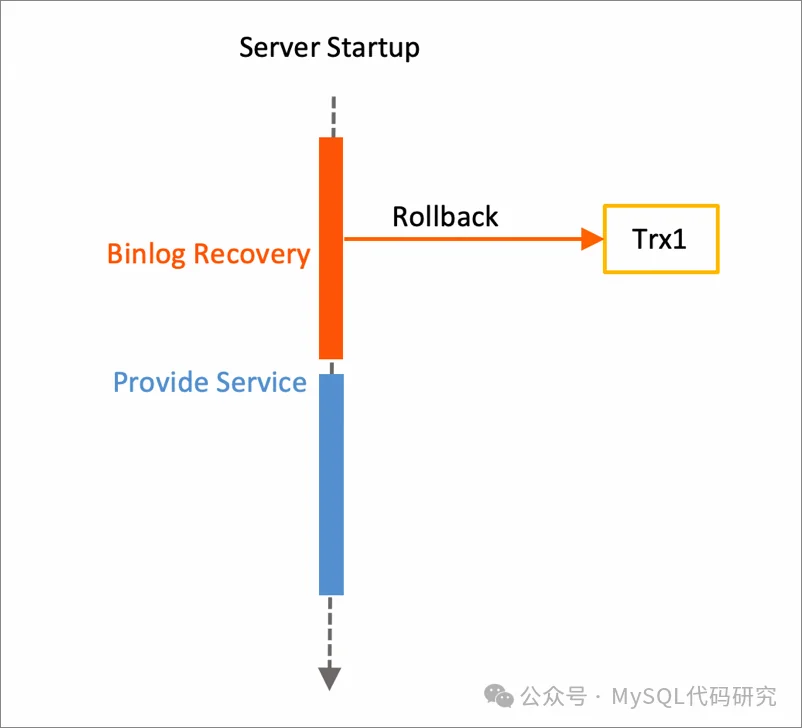
Handling Prepared transactions is called Binlog Recovery, and it must be completed before MySQL starts serving users. Committing a transaction is usually fast, but rolling one back generally takes about as long as executing it did. If a transaction took an hour to execute, the rollback will very likely take another hour, and MySQL is unavailable throughout.
Why must all these transactions be resolved before the server starts serving? It has to do with how the XID is implemented. An XID is made up of the MySQL prefix plus a query_id, and query_id is a global counter that starts over from 1 after a restart. If the earlier Prepared transactions are neither committed nor rolled back after startup, two Prepared transactions may end up with the same XID, and recovery has no way to tell which one to commit and which one to roll back.
Rolling Back Prepared Transactions Asynchronously
In AliSQL, we designed an asynchronous rollback mechanism to solve this problem.
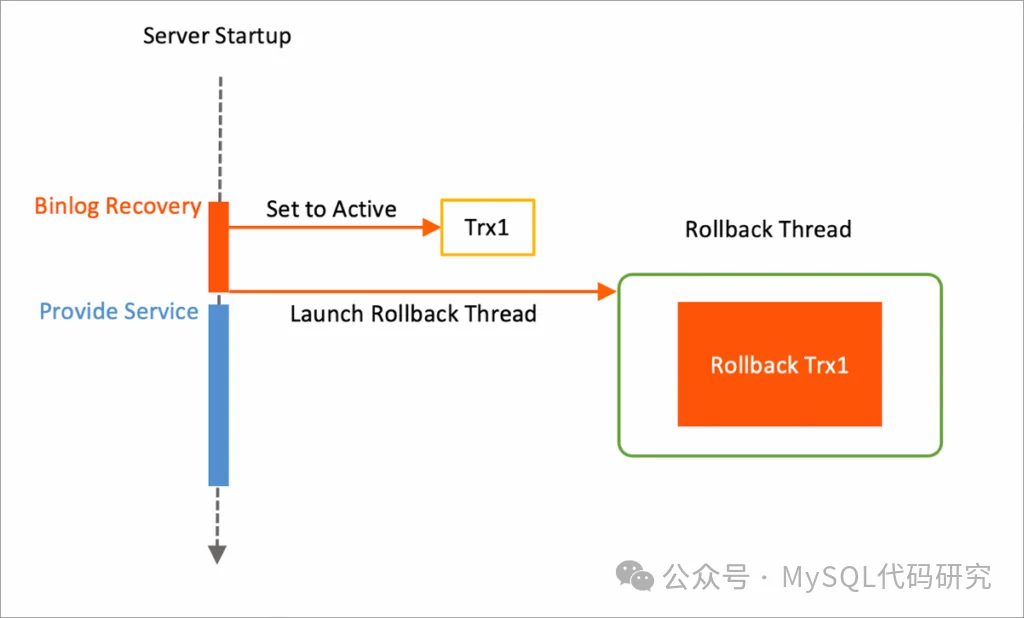
As the figure shows, this design splits the rollback of a Prepared transaction into two parts:
- The main thread sets the transaction state to
Activeand persists that state. - InnoDB’s background rollback thread asynchronously rolls back all of the transaction’s changes.
Binlog Recovery can start serving traffic as soon as the first part is done. Since that step executes very quickly, Binlog Recovery finishes in a very short time.
After a crash and restart, Active transactions are rolled back directly by InnoDB’s background thread, without needing the XID to drive the decision. So during recovery, simply changing the state of the transactions to be rolled back from Prepared to Active avoids the problem of two Prepared transactions sharing an XID. The key here is to persist the Active state, so that the transaction is still Active after a crash and restart and InnoDB will roll it back automatically.
Community InnoDB already rolls a Prepared transaction back by first setting it to
Activeand then undoing it from the undo records. TheActivestate is written to the redo log; it is simply not persisted at that moment. However, InnoDB persists the redo log once per second by default, so the state gets persisted very soon after the change. This means that when a large-transaction rollback keeps an instance from starting, even on community MySQL, we only need to force a restart of the mysqld process and the large transaction turns into a background rollback that no longer blocks startup.
The source code for this feature was contributed to MariaDB and has been merged into MariaDB 11.7; see MDEV-33853 for details.
Conclusion
With the asynchronous rollback design, the Binlog Recovery phase only has to set Prepared transactions to Active, while the genuinely time-consuming rollback is carried out asynchronously by InnoDB’s background rollback thread. This optimization shortens a startup that used to take tens of minutes, or even hours, to one that completes in seconds.